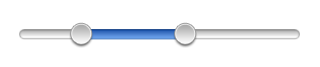
#import <UIKit/UIKit.h>
@protocolRangeSliderDelegate;
@interfaceRangeSlider : UIControl{@privateid<RangeSliderDelegate>delegate_;floatminimumValue_;floatmaximumValue_;floatminimumSpan_;floatmaximumSpan_;floatsmallValue_;floatlargeValue_;floatoffsetTrend_;intinsetWidthLeft_;intrangeWidth_;UIImageView*selectionView_;UIImageView*smallHandle_;UIImageView*largeHandle_;BOOLisTrackingSmallHandle_;BOOLisTrackingLargeHandle_;BOOLisTrackingSelection_;BOOLisDragging_;}// The delegate object.
@property(nonatomic,assign)id<RangeSliderDelegate>delegate;// The minimum value of the slider.
// The default value is 0.0.
@property(nonatomic,assign)floatminimumValue;// The maximum value of the slider.
// The default value is 1.0.
@property(nonatomic,assign)floatmaximumValue;// The minimum span of the selected range.
// The default value is 0.1.
@property(nonatomic,assign)floatminimumSpan;// The maximum span of the selected range.
// The default value is 1.0.
@property(nonatomic,assign)floatmaximumSpan;// The lower bound of the selected range.
@property(nonatomic,assign,setter=setSmallValue:)floatsmallValue;// The higher bound of the selected range.
@property(nonatomic,assign,setter=setLargeValue:)floatlargeValue;// A Boolean value that indicates whether the user has begun dragging.
@property(nonatomic,assign,readonly)BOOLisDragging;// Initialization with frame, also specify the inset of left and right edge.
-(id)initWithFrame:(CGRect)frameinsetLeft:(int)insetLeftinsetRight:(int)insetRight;// Move the current selection.
-(void)moveSelection:(float)offset;// Gets offset trend, it will be reset to 0 after call finished.
-(float)getAndResetOffsetTrend;// Converts slider value to x coor.
-(float)xForValue:(float)value;// Converts x coor to slider value.
-(float)valueForX:(float)x;@end
RangeSliderDelegate
objc
 1
 2
 3
 4
 5
 6
 7
 8
 9
10
11
12
@protocolRangeSliderDelegate<NSObject>@optional// Tells the delegate when the slider is about to start dragging.
// The delegate might not receive this message until dragging has occurred over a small distance.
-(void)rangeSliderWillBeginDragging:(RangeSlider*)rangeSlider;// Tells the delegate when dragging ended in the range slider.
// This message is sent when the user's finger touches up after dragging.
-(void)rangeSliderDidEndDragging:(RangeSlider*)rangeSlider;@end
接口中的大部分内容都在需求和功能介绍部分见过了。另外有两个方法,xForValue 和 valueForX,它们用来在 Range
Slider 内部的坐标值和用户数值之间做转换,内容如下(这里的 insetWidth 是在 UI 上做的小伎俩,主要是为了保证滑块滑到最两端时也能有充足的空间来接受用户的点击):
-(id)initWithFrame:(CGRect)frameinsetLeft:(int)insetLeftinsetRight:(int)insetRight{self=[superinitWithFrame:frame];if(self!=nil){// Set the initial state.
minimumValue_=0.0f;maximumValue_=1.0f;minimumSpan_=0.1f;maximumSpan_=0.7f;smallValue_=minimumValue_;largeValue_=minimumValue_+maximumSpan_;offsetTrend_=0.0f;insetWidthLeft_=insetLeft;rangeWidth_=frame.size.width-insetLeft-insetRight;isTrackingSmallHandle_=NO;isTrackingLargeHandle_=NO;isTrackingSelection_=NO;isDragging_=NO;floatcenterY=frame.size.height/2.0f;// Background image.
UIImageView*background=[[[UIImageViewalloc]initWithImage:[UIImageimageNamed:@"rangeslider-bg.png"]]autorelease];background.frame=CGRectMake(insetWidthLeft_,0,rangeWidth_,background.frame.size.height);background.center=CGPointMake(background.center.x,centerY);[selfaddSubview:background];// Selection image.
selectionView_=[[[UIImageViewalloc]initWithImage:[UIImageimageNamed:@"rangeslider-select.png"]highlightedImage:[UIImageimageNamed:@"rangeslider-select-hover.png"]]autorelease];selectionView_.center=CGPointMake(0,centerY);[selfaddSubview:selectionView_];// Left handle for small value selection.
smallHandle_=[[[UIImageViewalloc]initWithImage:[UIImageimageNamed:@"rangeslider-handle.png"]highlightedImage:[UIImageimageNamed:@"rangeslider-handle-hover.png"]]autorelease];smallHandle_.center=CGPointMake(0,centerY);[selfaddSubview:smallHandle_];// Right handle for small value selection.
largeHandle_=[[[UIImageViewalloc]initWithImage:[UIImageimageNamed:@"rangeslider-handle.png"]highlightedImage:[UIImageimageNamed:@"rangeslider-handle-hover.png"]]autorelease];largeHandle_.center=CGPointMake(0,centerY);[selfaddSubview:largeHandle_];[selfupdateSelectionView];}returnself;}