首页 / 旧站
iOS 在 UIAlertView 中显示进度条
| 发表于 2011年12月9日 | 更新于 2011年12月21日
今天这个问题是,在一个 iPhone 程序中,我要在后台做大量的数据处理,希望在界面上显示一个进度条(Progress
Bar)使得用户了解处理进度。这个进度条应该是在一个模态的窗口中,使界面上其他控件无法被操作。怎么用最简单的方法来实现这个功能?UIAlertView 是一个现成的模态窗口,如果能把进度条嵌入到它里面就好了。
以下内容适用于 iOS 2.0+。
我们知道,如果要显示一个 alert 窗口(比如用来显示错误或警告信息、询问用户是否确认某操作等等),只要简单地创建一个 UIAlertView 对象,再调用其 show 方法即可。示意代码如下:
objc
复制
1
2
3
4
5
6
7
UIAlertView * alertView = [[[ UIAlertView alloc ] initWithTitle : @"Title"
message : @"Message"
delegate : nil
cancelButtonTitle : @"OK"
otherButtonTitles : nil ]
autorelease ];
[ alertView show ];
如果要添加一个进度条,只要先创建并设置好一个 UIProgressView 的实例,再利用 addSubbiew 方法添加到 alertView 中即可。
在实际应用中,我可能需要在类中保存进度条的对象实例,以便更新其状态,因此先在自己的 ViewController 类中添加成员变量:
objc
复制
1
2
3
4
5
6
7
8
9
// MySampleViewController.h
#import <UIKit/UIKit.h>
@interface MySampleViewController : UIViewController {
@private
UIProgressView * progressView_ ;
}
@end
接下来写一个叫做 showProgressAlert 的方法来创建并显示带有进度条的 alert 窗口,其中高亮的部分就是把进度条添加到 alertView 中:
objc
复制
 1
 2
 3
 4
 5
 6
 7
 8
 9
10
11
12
13
14
- ( void ) showProgressAlert: ( NSString * ) title withMessage: ( NSString * ) message {
UIAlertView * alertView = [[[ UIAlertView alloc ] initWithTitle : title
message : message
delegate : nil
cancelButtonTitle : nil
otherButtonTitles : nil ]
autorelease ];
progressView_ = [[ UIProgressView alloc ] initWithProgressViewStyle : UIProgressViewStyleBar ];
progressView_ . frame = CGRectMake ( 30 , 80 , 225 , 30 );
[ alertView addSubview : progressView_ ];
[ alertView show ];
}
为了让数据处理的子进程能够方便地修改进度条的值,再添加一个简单的方法:
objc
复制
1
2
3
- ( void ) updateProgress: ( NSNumber * ) progress {
progressView_ . progress = [ progress floatValue ];
}
另外,数据处理完毕后,我们还需要让进度条以及 alertView 消失,由于之前并没有保存 alertView 的实例,可以通过进度条的 superview 访问之:
objc
复制
 1
 2
 3
 4
 5
 6
 7
 8
 9
10
11
12
13
- ( void ) dismissProgressAlert {
if ( progressView_ == nil ) {
return ;
}
if ([ progressView_ . superview isKindOfClass :[ UIAlertView class ]]) {
UIAlertView * alertView = ( UIAlertView * ) progressView_ . superview ;
[ alertView dismissWithClickedButtonIndex : 0 animated : NO ];
}
[ progressView_ release ];
progressView_ = nil ;
}
假设处理数据的方法叫 processData,当然它会在一个单独的线程中运行,下面的片段示意了如何更新进度条状态,以及最后如何让它消失。
objc
复制
 1
 2
 3
 4
 5
 6
 7
 8
 9
10
11
12
13
14
15
16
17
18
19
- ( void ) processData: ( int ) total {
for ( int i = 0 ; i < total ; ++ i ) {
// Update UI to show progess.
float progress = ( float ) i / total ;
NSNumber * progressNumber = [ NSNumber numberWithFloat : progress ];
[ self performSelectorOnMainThread : @selector ( updateProgress :)
withObject : progressNumber
waitUntilDone : NO ];
// Process.
// do it.
}
// Finished.
[ self performSelectorOnMainThread : @selector ( dismissProgressAlert )
withObject : nil
waitUntilDone : YES ];
// Other finalizations.
}
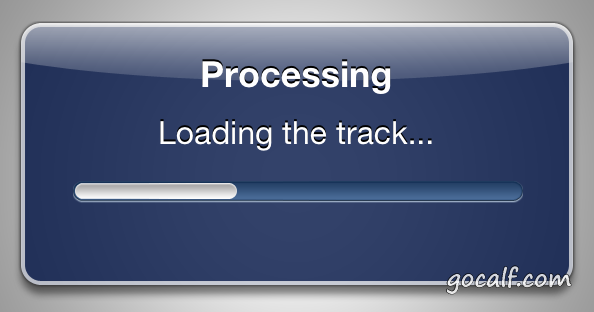
在实际使用中,带进度条的 alert view 大概长得是这样的:
带进度条的 alert 窗口 参考: